

C++ DataGridView Uygulaması
Merhaba arkadaşlar bu makalemizde dataGridview uygulaması yapacağız.
C++ da Windows Form nasıl ekleriz? Konusunu daha önceki makalede anlatmıştım. Önceki makaleye ulaşmak için Buraya tıklayabilirsiniz.
Formumuza 1 adet dataGridView ve 2 adet button ekliyoruz. Bu örnekte veritabanına bağlantı yapmadan, dataGridView nesnesine sütun ve satır ekleyeceğiz. Eklenen satırları dataGridView da silebileceğiz. Ayrıca seçili sütundaki veriye mesaj olarak gösterimini sağlayacağız.
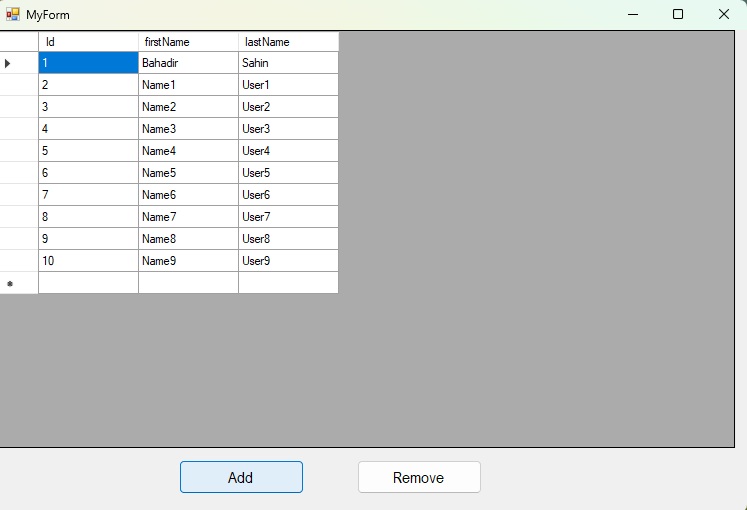
Şekil 1
MyForm.h
#pragma once
namespace cppdatagridviewarray {
using namespace System;
using namespace System::ComponentModel;
using namespace System::Collections;
using namespace System::Windows::Forms;
using namespace System::Data;
using namespace System::Drawing;
/// <summary>
/// Summary for MyForm
/// </summary>
public ref class MyForm : public System::Windows::Forms::Form
{
public:
MyForm(void)
{
InitializeComponent();
//
//TODO: Add the constructor code here
//
// dataGridView nesnesine sutun ekliyoruz
// Add the columns
dataGridView1->ColumnCount = 3;
dataGridView1->Columns[0]->Name = "Id";
dataGridView1->Columns[1]->Name = "firstName";
dataGridView1->Columns[2]->Name = "lastName";
}
protected:
/// <summary>
/// Clean up any resources being used.
/// </summary>
~MyForm()
{
if (components)
{
delete components;
}
}
private: System::Windows::Forms::DataGridView^ dataGridView1;
private: System::Windows::Forms::Button^ btnAdd;
private: System::Windows::Forms::Button^ btnRemove;
protected:
private:
/// <summary>
/// Required designer variable.
/// </summary>
System::ComponentModel::Container ^components;
#pragma region Windows Form Designer generated code
/// <summary>
/// Required method for Designer support - do not modify
/// the contents of this method with the code editor.
/// </summary>
void InitializeComponent(void)
{
this->dataGridView1 = (gcnew System::Windows::Forms::DataGridView());
this->btnAdd = (gcnew System::Windows::Forms::Button());
this->btnRemove = (gcnew System::Windows::Forms::Button());
(cli::safe_cast<System::ComponentModel::ISupportInitialize^>(this->dataGridView1))->BeginInit();
this->SuspendLayout();
//
// dataGridView1
//
this->dataGridView1->ColumnHeadersHeightSizeMode = System::Windows::Forms::DataGridViewColumnHeadersHeightSizeMode::AutoSize;
this->dataGridView1->Location = System::Drawing::Point(0, 0);
this->dataGridView1->Name = L"dataGridView1";
this->dataGridView1->Size = System::Drawing::Size(738, 418);
this->dataGridView1->TabIndex = 0;
this->dataGridView1->CellClick += gcnew System::Windows::Forms::DataGridViewCellEventHandler(this, &MyForm::dataGridView1_CellClick);
//
// btnAdd
//
this->btnAdd->Font = (gcnew System::Drawing::Font(L"Arial Narrow", 12, System::Drawing::FontStyle::Regular, System::Drawing::GraphicsUnit::Point,
static_cast<System::Byte>(162)));
this->btnAdd->Location = System::Drawing::Point(182, 430);
this->btnAdd->Name = L"btnAdd";
this->btnAdd->Size = System::Drawing::Size(125, 34);
this->btnAdd->TabIndex = 1;
this->btnAdd->Text = L"Add";
this->btnAdd->UseVisualStyleBackColor = true;
this->btnAdd->Click += gcnew System::EventHandler(this, &MyForm::btnAdd_Click);
//
// btnRemove
//
this->btnRemove->Font = (gcnew System::Drawing::Font(L"Arial Narrow", 12, System::Drawing::FontStyle::Regular, System::Drawing::GraphicsUnit::Point,
static_cast<System::Byte>(162)));
this->btnRemove->Location = System::Drawing::Point(360, 430);
this->btnRemove->Name = L"btnRemove";
this->btnRemove->Size = System::Drawing::Size(125, 34);
this->btnRemove->TabIndex = 2;
this->btnRemove->Text = L"Remove";
this->btnRemove->UseVisualStyleBackColor = true;
this->btnRemove->Click += gcnew System::EventHandler(this, &MyForm::btnRemove_Click);
//
// MyForm
//
this->AutoScaleDimensions = System::Drawing::SizeF(6, 13);
this->AutoScaleMode = System::Windows::Forms::AutoScaleMode::Font;
this->ClientSize = System::Drawing::Size(750, 482);
this->Controls->Add(this->btnRemove);
this->Controls->Add(this->btnAdd);
this->Controls->Add(this->dataGridView1);
this->Name = L"MyForm";
this->StartPosition = System::Windows::Forms::FormStartPosition::CenterScreen;
this->Text = L"MyForm";
this->Load += gcnew System::EventHandler(this, &MyForm::MyForm_Load);
(cli::safe_cast<System::ComponentModel::ISupportInitialize^>(this->dataGridView1))->EndInit();
this->ResumeLayout(false);
}
#pragma endregion
int rowIndex;
private: System::Void MyForm_Load(System::Object^ sender, System::EventArgs^ e) {
// Array metoduyla dgridview a satir ekliyoruz
//Add using an array of strings
array<String^>^ row1 = { "1", "Bahadir", "Sahin" };
dataGridView1->Rows->Add(row1);
}
private: System::Void btnAdd_Click(System::Object^ sender, System::EventArgs^ e) {
// Direkt satir indeksini kullanarak
// dgView a satiri ekliyoruz
// Add using the Rows index directly
rowIndex = dataGridView1->Rows->Add();
dataGridView1->Rows[rowIndex]->Cells[0]->Value = rowIndex + 1;
dataGridView1->Rows[rowIndex]->Cells[1]->Value = "Name" + rowIndex;
dataGridView1->Rows[rowIndex]->Cells[2]->Value = "User" + rowIndex;
}
private: System::Void btnRemove_Click(System::Object^ sender, System::EventArgs^ e) {
dataGridView1->Rows->Clear();
}
private: System::Void dataGridView1_CellClick(System::Object^ sender, System::Windows::Forms::DataGridViewCellEventArgs^ e) {
// Secili sutundaki degeri aliyoruz
// We get the value in the selected column
if (e->RowIndex >= 0) {
String^ selectedItem = dataGridView1->Rows[e->RowIndex]->Cells[1]->Value->ToString();
MessageBox::Show("You clicked on: " + selectedItem);
}
}
};
}
MyForm.cpp
#include "MyForm.h"
using namespace System;
using namespace System::Windows::Forms;
[STAThreadAttribute]
void Main(array<String^>^ args) {
Application::EnableVisualStyles();
Application::SetCompatibleTextRenderingDefault(false);
cppdatagridviewarray::MyForm form;
Application::Run(% form);
}
Bir makalenin daha sonuna geldik. Bir sonraki makalede görüşmek üzere. Bahadır ŞAHİN