

Javascript Kullanarak Web Sayfaları Arasında Veri Göndermek
Merhaba arkadaşlar bu makalemizde web sayfaları arasında javascript kullanarak veri gönderimine bakacağız. Projemize iki web sayfası ekliyoruz. Birinci web sayfamızda NameValueCollection metodu ile İkinci sayfaya taşıyacağımız verilerin girişini yapıyoruz. StringBuilder ile web sayfamızın formunu oluşturuyoruz ve javascript i tanımlıyoruz. İkinci sayfada Response.Write kullanarak sayfamızda tablomuzu oluşturuyoruz.
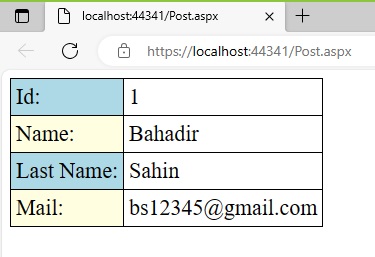
Şekil 1
WebForm1.aspx.cs
using Microsoft.SqlServer.Server;
using System;
using System.Collections.Generic;
using System.Collections.Specialized;
using System.Linq;
using System.Text;
using System.Web;
using System.Web.UI;
using System.Web.UI.WebControls;
namespace post_method
{
public partial class WebForm1 : System.Web.UI.Page
{
protected void Page_Load(object sender, EventArgs e)
{
string url = "Post.aspx";
NameValueCollection data = new NameValueCollection();
data.Add("Id", "1");
data.Add("Name", "Bahadir");
data.Add("LastName", "Sahin");
data.Add("Mail", "bs12345@gmail.com");
//Set a name for the form
//Forma isim veriyoruz
string formID = "Form";
//Build the form using the specified data to be posted
//Gonderilecek olan belirtilmis olan verileri kullanarak formu olustur
StringBuilder strForm = new StringBuilder();
strForm.Append("<form id=\"" + formID + "\" name=\"" +
formID + "\" action=\"" + url +
"\" method=\"POST\">");
foreach (string key in data)
{
strForm.Append("<input type=\"hidden\" name=\"" + key +
"\" value=\"" + data[key] + "\">");
}
strForm.Append("</form>");
//Build the JavaScript which will do the Posting operation
//Gonderme islemini gerceklestirecek JavaScript i olusturun
StringBuilder strScript = new StringBuilder();
strScript.Append("<script language=\"javascript\">");
strScript.Append("var v" + formID + " = document." +
formID + ";");
strScript.Append("v" + formID + ".submit();");
strScript.Append("</script>");
//Return the form and the script concatenated.
//Formu ve birlestirilmis komut dosyasini dondurun
//(The order is important, Form then JavaScript)
//(Sıra onemlidir, Formdan sonra JavaScript)
this.Page.Controls.Add(new LiteralControl(strForm.ToString() + strScript.ToString()));
}
}
}
WebForm.aspx
<%@ Page Language="C#" AutoEventWireup="true" CodeBehind="WebForm1.aspx.cs" Inherits="post_method.WebForm1" %>
<!DOCTYPE html>
<html xmlns="http://www.w3.org/1999/xhtml">
<head runat="server">
<title></title>
</head>
<body>
<form id="form1" runat="server">
<div>
</div>
</form>
</body>
</html>
Post.aspx.cs
using System;
using System.Collections.Generic;
using System.Linq;
using System.Web;
using System.Web.UI;
using System.Web.UI.WebControls;
namespace post_method
{
public partial class Post : System.Web.UI.Page
{
protected void Page_Load(object sender, EventArgs e)
{
try
{
Response.Write("<table cellpadding='5' style='border:1px solid black; border-collapse:collapse; font-size:22; font-name:arial' >");
Response.Write("<tr>");
Response.Write("<td style=' border-width:1px;border-style:solid;border-color:black; background-color:lightblue;'>");
Response.Write("Id: ");
Response.Write("</td>");
Response.Write("<td style=' border-width:1px;border-style:solid;border-color:black;'>");
Response.Write(Request.Form["Id"].ToString() );
Response.Write("</td>");
Response.Write("<tr>");
Response.Write("<td style=' border-width:1px;border-style:solid;border-color:black;background-color:lightyellow;'>");
Response.Write("Name: ");
Response.Write("</td>");
Response.Write("<td style=' border-width:1px;border-style:solid;border-color:black;'>");
Response.Write(Request.Form["Name"].ToString());
Response.Write("</td>");
Response.Write("</tr>");
Response.Write("<tr>");
Response.Write("<td style=' border-width:1px;border-style:solid;border-color:black; background-color:lightblue;'>");
Response.Write("Last Name: ");
Response.Write("</td>");
Response.Write("<td style=' border-width:1px;border-style:solid;border-color:black;'>");
Response.Write(Request.Form["LastName"].ToString());
Response.Write("</td>");
Response.Write("<tr>");
Response.Write("<td style=' border-width:1px;border-style:solid;border-color:black;background-color:lightyellow;'>");
Response.Write("Mail: ");
Response.Write("</td>");
Response.Write("<td style=' border-width:1px;border-style:solid;border-color:black;'>");
Response.Write(Request.Form["Mail"].ToString());
Response.Write("</td>");
Response.Write("</tr>");
Response.Write("</table>");
}
catch (Exception ex)
{
Response.Write(ex.Message);
}
}
}
}
Post.aspx
<%@ Page Language="C#" AutoEventWireup="true" CodeBehind="Post.aspx.cs" Inherits="post_method.Post" %>
<!DOCTYPE html>
<html xmlns="http://www.w3.org/1999/xhtml">
<head runat="server">
<title></title>
</head>
<body>
<form id="form1" runat="server">
<div>
</div>
</form>
</body>
</html>
Bir makalenin daha sonuna geldik. Bir sonraki makalede görüşmek üzere. Bahadır ŞAHİN