

Dinamik Olarak TextBox ın PlaceHolder Text ini Değiştirmek
Merhaba arkadaşlar bu makalemizde javascript kullanarak textBox nesnesinin Placeholder metinini dinamik olarak değiştireceğiz. Dropdownlist nesnesinde item değiştirdiğimizde textBox ta placeholder metini değişmektedir.
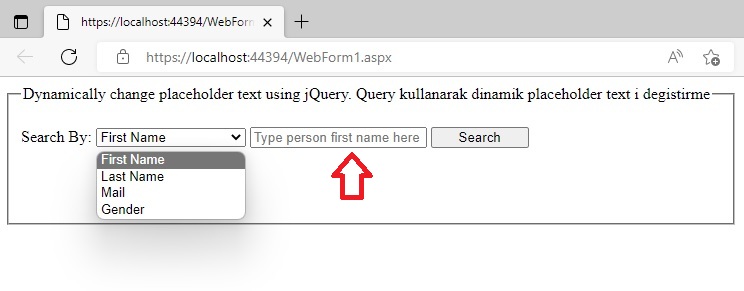
Şekil 1
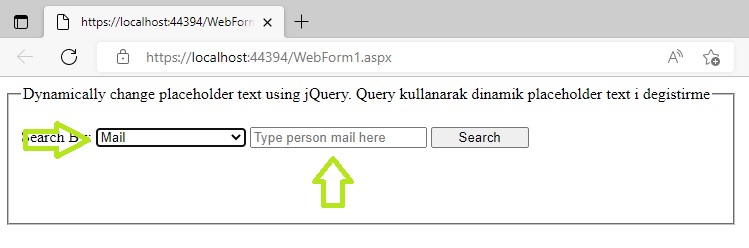
Şekil 2
WebForm1.aspx.cs
using System;
using System.Collections.Generic;
using System.Linq;
using System.Web;
using System.Web.UI;
using System.Web.UI.WebControls;
namespace textbox_set_placeholder_text
{
public partial class WebForm1 : System.Web.UI.Page
{
}
}
WebForm1.aspx
<%@ Page Language="C#" AutoEventWireup="true" CodeBehind="WebForm1.aspx.cs" Inherits="textbox_set_placeholder_text.WebForm1" %>
<!DOCTYPE html>
<html xmlns="http://www.w3.org/1999/xhtml">
<head runat="server">
<title></title>
<script src="https://ajax.googleapis.com/ajax/libs/jquery/1.11.3/jquery.min.js"></script>
<script src="javascript/jquery.min.js"></script>
<script type="text/javascript">
function SetPlaceHolderText() {
var SelectedValue = $('#ddlSearchBy option:selected').val();
if (SelectedValue == 1) {
$('#txtSearchKey').prop('placeholder', 'Type person first name here');
}
else if (SelectedValue == 2) {
$('#txtSearchKey').prop('placeholder', 'Type person last name here');
}
else if (SelectedValue == 3) {
$('#txtSearchKey').prop('placeholder', 'Type person mail here');
}
else {
$('#txtSearchKey').prop('placeholder', 'Type Male or Female');
}
}
</script>
</head>
<body>
<form id="form1" runat="server">
<div>
<fieldset style="width:700px; height:120px;">
<legend>Dynamically change placeholder text using jQuery.
Query kullanarak dinamik placeholder text i degistirme</legend>
<br />
Search By:
<asp:DropDownList ID="ddlSearchBy" ClientIDMode="Static" runat="server" onchange="SetPlaceHolderText();"
Style="width: 150px">
<asp:ListItem Text="First Name" Value="1"></asp:ListItem>
<asp:ListItem Text="Last Name" Value="2"></asp:ListItem>
<asp:ListItem Text="Mail" Value="3"></asp:ListItem>
<asp:ListItem Text="Gender" Value="4"></asp:ListItem>
</asp:DropDownList>
<asp:TextBox ID="txtSearchKey" ClientIDMode="Static" runat="server" placeholder="Type person first name here"></asp:TextBox>
<asp:Button ID="btnSearch" runat="server" Text="Search" Width="98px" />
</fieldset>
</div>
</form>
</body>
</html>
Bir makalenin daha sonuna geldik. Bir sonraki makalede görüşmek üzere. Bahadır ŞAHİN